Book a demo Login
Workplace Resources Webinars Case Studies Guides Blog Podcast

What Happens When Your Space Management and Booking Solutions Finally Meet?

The gap between your space management and workplace booking solutions is derailing your hybrid workplace strategy. Here's why, and how Connect+ (HubStar's space management and workplace booking solutions) were built to bridge that gap.

7 min read 3 June 2026

Jackie Towers

Connect-featured-image-2

A plan that’s perfect on paper isn’t worth much if it can’t be successfully executed in real life. 


Most workplace teams fall into two camps for space management and booking. Neither can keep up with the speed of hybrid workplace change. 


The first is an IWMS, which might seem like it can take care of all workplace functionalities but actually can’t because of its size and heavy customization. 


The second is a point solution for space management and another for workplace booking. They’re nimbler and easier to implement, but not built to handle the complexity of hybrid work. 


HubStar’s space management and booking solutions were built interoperably, on a completely different premise – that every workplace function is interlinked. Space management and booking are two sides of the same operation, and treating them separately is where workplace agility slows down. 


Most organizations change their floorplans weekly if not daily. Workplace teams are under pressure to get ROI from every square inch of the portfolio, so every underutilized desk gets a raised eyebrow. With every hybrid employee choosing whether the office is worth the commute, leaders are accountable for raising the workplace experience bar higher on a daily basis. 


The gap between your space management and booking systems is one more failure-prone area that workplace leaders are now accountable for too. 


Connect+ (HubStar’s space management solution, Hub, and booking solution, Connect, as an interoperable package) is HubStar’s answer to this gap. 


When space management changes, booking reflects it instantly, and when booking behavior changes, space management responds.

Space management & booking separate Hub & Connect together 
Manual floorplan uploading, editing and publishing Automated, standardized floor plan uploading, editing and publishing
Disconnect between what employees see in the booking interface and what they experience in the workplace What employees see in Connect is what they get in the office
Change management processes after space planning, seating assignment and hybrid policy changes No extra change management processes

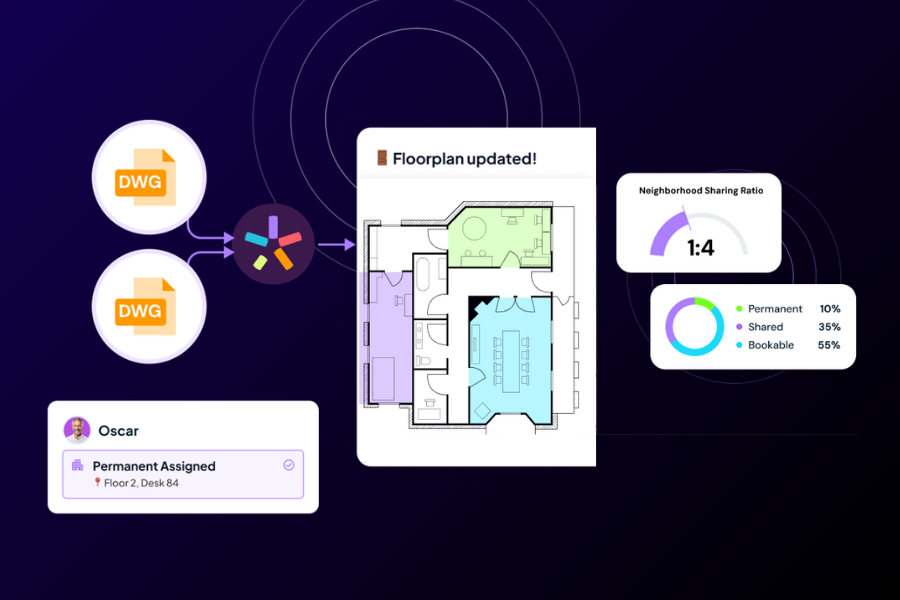
Hub eliminates the blind spots at the core of your space management processes. 

If your space management tool isn’t built for hybrid, it won’t tell you anything about the work patterns of the people using the spaces you’re planning. 


But with Hub, you get: 


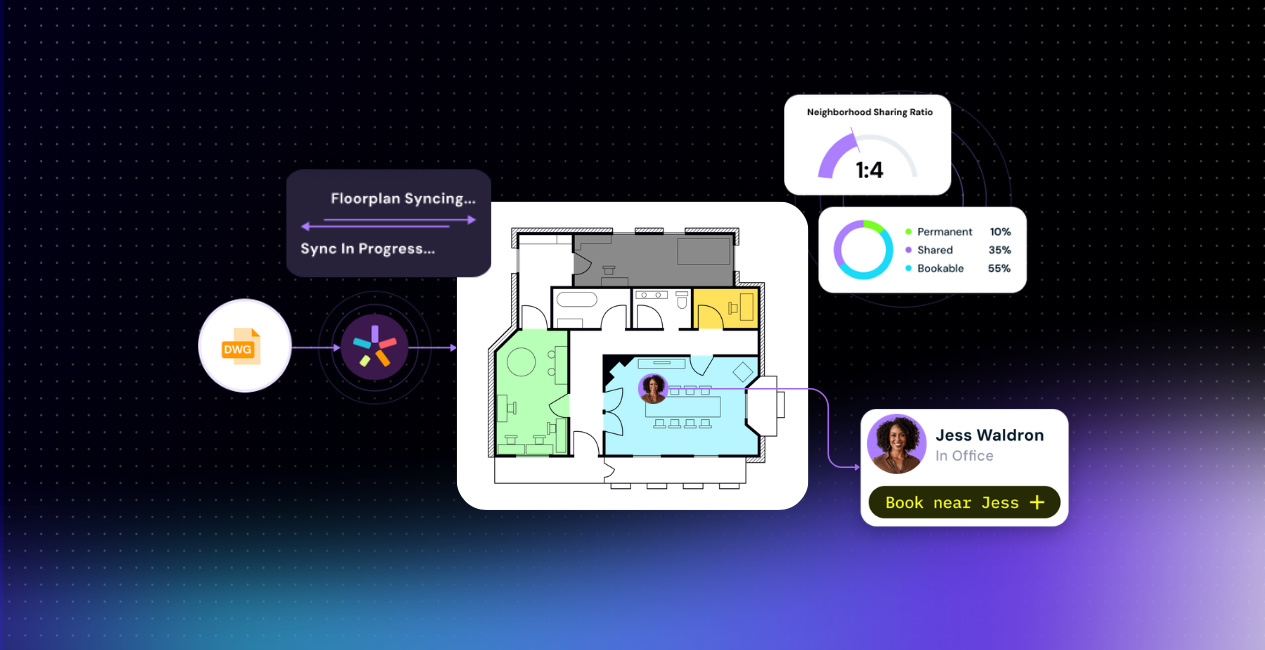
  • Accurate, standardized floorplans. Hub ingests DWG files and their associated data directly from AutoCAD, standardizes them across the portfolio and auto-publishes them when changes are made. Floorplans are easier to edit and maintain, reducing time spent on maintenance by 80%

  • A single data foundation for accurate decisions. Hub integrates directly with HR systems like Workday, so you can assign someone to a dedicated desk, neighborhood, shared desk on specific days or anything in between. Unlike tools built around the pre-pandemic 1 person to 1 desk sharing ratio, Hub is built to handle complex hybrid work patterns. If someone’s work patterns change or they move on, the plan adapts around that

  • A solid foundation for all your workplace decisions. Hub combines supply and demand data into one place. Since data is always up-to-date, space decisions are always data-driven and as a workplace leader you can be certain you’ve made the right call
hub-1

Connect makes the commute worth it.


Without Connect, the burden of hybrid schedule coordination falls on employees. Each small friction point between the experience employees have and the one they get is another reason not to bother coming in. 


But with Connect, you’ll get:


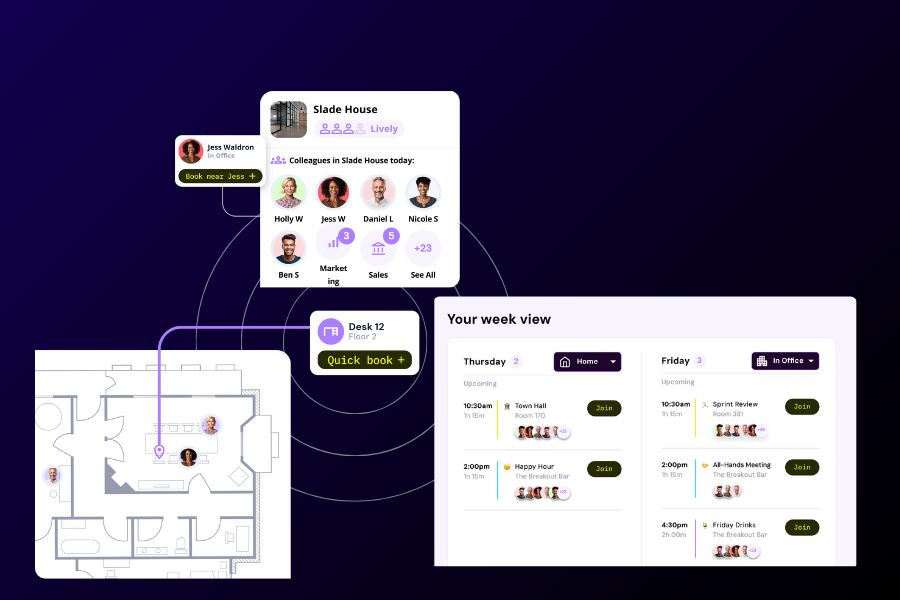
  • A booking experience built into what everyone’s already using. Connect works through Teams and Outlook on desktop and mobile, so there’s no new system to learn. That boosts adoption rates

  • A digital assistant that coordinates hybrid schedules. Based on colleagues’ schedules and how busy the office will be, Connect’s digital assistant suggests the best days for each employee to come into the office. Employees don’t have to take the time to coordinate hybrid schedules. Attendance increases naturally without hardline mandates

  • Interactive floorplans showing the best available desk. Connect displays where colleagues are sitting on an interactive floor plan and surfaces the closest desk to colleagues that’s bookable in a single click. Proximity and workplace preferences drive attendance organically without rigid seating plans or mandates.
CONNECT-2-1

Connect+: The Missing Link Between Space Planning and Employee Experience

If space management and booking function separately, your most innovative floor plans and convenient seating assignments never see the light of day. They’re outdated by the time employees see them. Many booking platforms claim to have space management capabilities, but only upload images of floorplans rather than interactive ones, creating more indiscrepancies between what employees see and what they get in the office. 

But with Hub and Connect working together, you’ll get: 

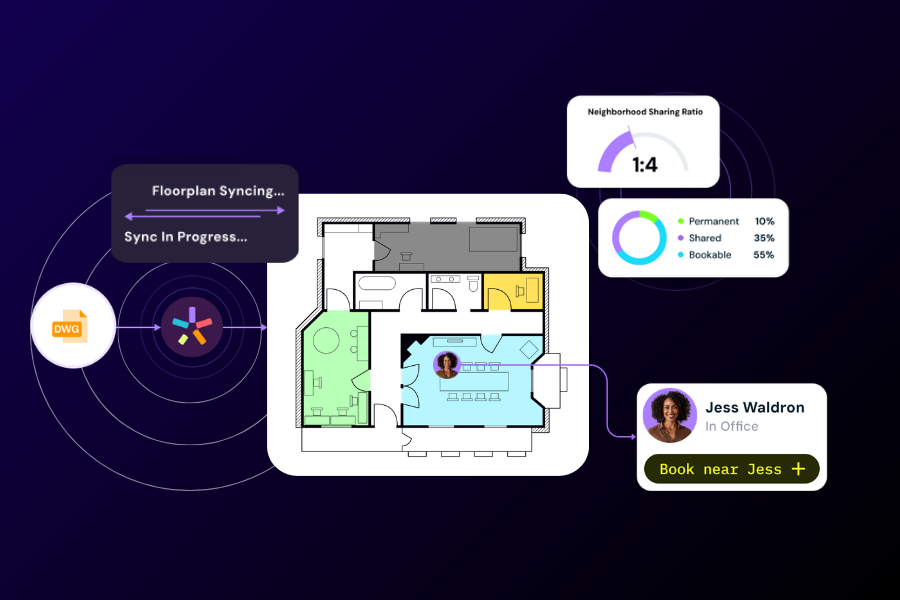
  • Space management and booking that get smarter over time. Hybrid work patterns from Hub’s HR integration are built directly into how employees book resources. And as employees book and use spaces, that data feeds back into Hub. That creates a data loop that improves both solutions over time

  • The right people in the right places at the right times without policing. Neighborhood allocations, seat assignments and booking rules set in Hub are enforced in Connect, so there’s no confusion and chaos when employees book the wrong spaces

  • A workplace experience that updates itself. When policies, seating plans and layouts change, there’s no need for extra admin, communications or change management procedures. That helps workplace teams spend less time on execution and more on strategy
 

connect-2

Top 3 Ways to Use Connect+

If you’ve found yourself in any of the following situations, Hub and Connect can help:


✅A portfolio resize and/or office relocation


Going through a lease expiry or an office move? To successfully fit more people into less space, you’ll need to model higher person-to-desk sharing ratios before roll-out. You’ll also need a system that ensures employees are sitting in the right spots on the right days and times. Hub shows you a complete inventory of available space and models employee demand, and Connect enforces the plan without extra admin or hardline mandates. 


✅Hybrid policy redesign(s)


You’ll need to make sure there will still be space for everyone on peak days and make sure there won’t be massive swathes of underutilization on emptier days. Hub aligns policy design with day-to-day workplace behaviour, making sure there’s enough space for each team and the right level of office buzz. Connect executes the new policies, only suggesting the appropriate days and locations when employees plan a day in the office. 


✅Moving from assigned to neighborhood seating 


You’ll need to ensure new neighborhoods are best suited to each team or department, and you’ll need a system that makes it all work organically without extra governance. In Hub, you can assign teams to the most suitable neighborhoods for the ways they work. In Connect, teams will only see seating options within the neighborhoods they’ve been assigned to, so there are no extra admin or change management procedures. Changes to team sizes or new space allocations made in Hub are automatically seen by employees in Connect.

Now you can keep up with hybrid change instead of reacting to it.

Already using Hub or Connect and want to see what the full platform can do for your workplace? 

Speak to your account manager.

 

Jackie Towers

7 min read 3 June 2026

Share this post

"HubStar enabled us to save millions in operating costs while not only avoiding disruption, but improving employee experience."

Fortune 500

Global Real Estate Lead @ Fortune 500 Company

"We will not make any meaningful real estate and workplace decisions without HubStar data."

Fortune 500

Global Real Estate Lead @ Fortune 500 Company

"HubStar allows us to see how space is being used and occupied, and helps us predict the space we’ll need going forward."

donna-porter

Donna Porter

Senior Space Manager @ Sheffield Hallam University

"Team were very happy! Implementation was great. We were up and running in days."

gavel_88dp_FFFFFF

Law Practice

"Perfect fit. The application works very well, and the support given has been exceptional. This was originally required for desk booking, but the business quickly took to the system and have been requesting further functionality since."

oil_barrel_300dp_FFFFFF

Application Analyst @ Oil & Energy Company

"Brilliant solution for managing office space. We've been able to be proactive and intentional about making our office space work."

5-3

Commercial Director @ Technology & Services Company

"Would 100% recommended. Our account manager is by far the best and most approachable person I've met on any contract I've worked on. Nothings is too much. They always have the answer and help make the changes we need and want. Having this type of customer service really makes a difference."

groups_300dp_FFFFFF

Facilities Manager @ Civic & Social Organization

"Support response and attention to detail is exceptional. Highly recommend as very good value for the investment. Staff find it easy to use and integration to Microsoft Outlook is great. Support is excellent."

volunteer_activism_300dp_FFFFFF

ICT Manager @ Nonprofit Organization

"What we've found most useful is the ability to customise the system to suit our needs. The rules and policy engine have allowed us to build in desk and room booking processes to communicate well with our team, and manage the space in our building."

5-3

Commercial Director @ Technology & Services Company

"The standout features are it’s clean and simple interface, ability to integrate with Outlook and the simple way it can be deployed to the display screens outside our rooms, not to mention the high level of support that’s provided with the product."

AEU

Evan Henderson

IT Officer @ AEU Victoria

"User-friendly interface, real-time reservations, and effective resource management improve productivity and space use. I use it everyday."

engineering_300dp_FFFFFF

Civil Engineering Company

"Very adaptable, highly featured and easy to use. I like the ability to address our very detailed requirements in a quick implementation with a modern, attractive user interface."

diamond_300dp_FFFFFF

Luxury Goods & Jewellery Company

"My favourite feature is the Outlook integration, as it enables our staff to book meetings in a familiar way. The bookings are automatically transferred without any extra steps for the end user."

AEU

Evan Henderson

IT Officer @ AEU Victoria

"The system was so intuitive, we really didn’t need to give people a lot of training."

Russell-Group

Jeremy Wilson

Operations Manager @ Russell Group University

"The reporting has been brilliant."

Russell-Group

Jeremy Wilson

Operations Manager @ Russell Group University

"Employees need to be able to collaborate closely, working in one room. The office environment needs to align with this seamlessly. What that means for us is that we need to measure usage and occupancy rates and adjust the workspaces accordingly as needed."

Mark-van-Rijt

Mark van Rijt

Managing Director of Facility Management @ ABN AMRO Bank

"HubStar has removed so much admin from my daily to-do list. These days I only spend about an hour a week, covering six offices and 800 staff members. Before I was spending an hour a day messaging people back and forth! This means the system has cut the time I have to spend on managing bookings by 80%."

tristan-drinkwater

Tristan Drinkwater

Facilities & IT Services Manager @ Exertis

"There’s a tremendous range of reports that we use to measure capacity levels."

Russell-Group

Jeremy Wilson

Operations Manager @ Russell Group University

"HubStar allows us to see how space is being used and occupied, and helps us predict the space we’ll need going forward."

donna-porter

Donna Porter

Senior Space Manager @ Sheffield Hallam University

"The experience that users now have using HubStar is absolutely fantastic. The implementation went smoothly and our staff find the system really easy to use. The support I’ve had is phenomenal - incredibly knowledgeable about the product and so helpful. They’re second to none"

tristan-drinkwater

Tristan Drinkwater

Facilities & IT Services Manager @ Exertis

"With the single push of a button, my team gains insight into spaces that are consistently underutilised and how many ‘no-shows’ have taken place"

wur-350x350-1

Fred Jonker

Information Services Policy Officer @ Wageningen University & Research

"I’d absolutely recommend HubStar. If someone asked me why, I’d say it simply does everything you need it to do. The feature set is rich and covers all the requirements that most organisations are likely to have."

tristan-drinkwater

Tristan Drinkwater

Facilities & IT Services Manager @ Exertis

"HubStar enabled us to save millions in operating costs while not only avoiding disruption, but improving employee experience."

Fortune 500

Global Real Estate Lead @ Fortune 500 Company

"We will not make any meaningful real estate and workplace decisions without HubStar data."

Fortune 500

Global Real Estate Lead @ Fortune 500 Company

"HubStar allows us to see how space is being used and occupied, and helps us predict the space we’ll need going forward."

donna-porter

Donna Porter

Senior Space Manager @ Sheffield Hallam University

"Team were very happy! Implementation was great. We were up and running in days."

gavel_88dp_FFFFFF

Law Practice

"Perfect fit. The application works very well, and the support given has been exceptional. This was originally required for desk booking, but the business quickly took to the system and have been requesting further functionality since."

oil_barrel_300dp_FFFFFF

Application Analyst @ Oil & Energy Company

"Brilliant solution for managing office space. We've been able to be proactive and intentional about making our office space work."

5-3

Commercial Director @ Technology & Services Company

"Would 100% recommended. Our account manager is by far the best and most approachable person I've met on any contract I've worked on. Nothings is too much. They always have the answer and help make the changes we need and want. Having this type of customer service really makes a difference."

groups_300dp_FFFFFF

Facilities Manager @ Civic & Social Organization

"Support response and attention to detail is exceptional. Highly recommend as very good value for the investment. Staff find it easy to use and integration to Microsoft Outlook is great. Support is excellent."

volunteer_activism_300dp_FFFFFF

ICT Manager @ Nonprofit Organization

"What we've found most useful is the ability to customise the system to suit our needs. The rules and policy engine have allowed us to build in desk and room booking processes to communicate well with our team, and manage the space in our building."

5-3

Commercial Director @ Technology & Services Company

"The standout features are it’s clean and simple interface, ability to integrate with Outlook and the simple way it can be deployed to the display screens outside our rooms, not to mention the high level of support that’s provided with the product."

AEU

Evan Henderson

IT Officer @ AEU Victoria

"User-friendly interface, real-time reservations, and effective resource management improve productivity and space use. I use it everyday."

engineering_300dp_FFFFFF

Civil Engineering Company

"Very adaptable, highly featured and easy to use. I like the ability to address our very detailed requirements in a quick implementation with a modern, attractive user interface."

diamond_300dp_FFFFFF

Luxury Goods & Jewellery Company

"My favourite feature is the Outlook integration, as it enables our staff to book meetings in a familiar way. The bookings are automatically transferred without any extra steps for the end user."

AEU

Evan Henderson

IT Officer @ AEU Victoria

"The system was so intuitive, we really didn’t need to give people a lot of training."

Russell-Group

Jeremy Wilson

Operations Manager @ Russell Group University

"The reporting has been brilliant."

Russell-Group

Jeremy Wilson

Operations Manager @ Russell Group University

"Employees need to be able to collaborate closely, working in one room. The office environment needs to align with this seamlessly. What that means for us is that we need to measure usage and occupancy rates and adjust the workspaces accordingly as needed."

Mark-van-Rijt

Mark van Rijt

Managing Director of Facility Management @ ABN AMRO Bank

"HubStar has removed so much admin from my daily to-do list. These days I only spend about an hour a week, covering six offices and 800 staff members. Before I was spending an hour a day messaging people back and forth! This means the system has cut the time I have to spend on managing bookings by 80%."

tristan-drinkwater

Tristan Drinkwater

Facilities & IT Services Manager @ Exertis

"There’s a tremendous range of reports that we use to measure capacity levels."

Russell-Group

Jeremy Wilson

Operations Manager @ Russell Group University

"HubStar allows us to see how space is being used and occupied, and helps us predict the space we’ll need going forward."

donna-porter

Donna Porter

Senior Space Manager @ Sheffield Hallam University

"The experience that users now have using HubStar is absolutely fantastic. The implementation went smoothly and our staff find the system really easy to use. The support I’ve had is phenomenal - incredibly knowledgeable about the product and so helpful. They’re second to none"

tristan-drinkwater

Tristan Drinkwater

Facilities & IT Services Manager @ Exertis

"With the single push of a button, my team gains insight into spaces that are consistently underutilised and how many ‘no-shows’ have taken place"

wur-350x350-1

Fred Jonker

Information Services Policy Officer @ Wageningen University & Research

"I’d absolutely recommend HubStar. If someone asked me why, I’d say it simply does everything you need it to do. The feature set is rich and covers all the requirements that most organisations are likely to have."

tristan-drinkwater

Tristan Drinkwater

Facilities & IT Services Manager @ Exertis