What Is Dynamic Occupancy Planning?
Dynamic Occupancy Planning is the process of using workplace data to continuously plan office space around shifting attendance patterns, employee preferences, and business objectives. Unlike traditional space planning, which runs on a yearly or biannual cycle, it updates in real time as the workplace changes. In this post, we'll cover what that means, why it's necessary and how to get started.

Jackie Towers

How does a game of blindfolded pin the tail on the donkey where the consequence of missing is losing millions and even your credibility sound?
Most sensible people would prefer six root canals.
This is the game space planners and corporate real estate leaders are (unintentionally) playing on the daily.
The cause is the inability to plan spaces around how people actually occupy them.
The result, which is the figurative “miss” we’re getting at in the pin the tail on the donkey analogy, can be anything from operating empty spaces to making multi-million dollar portfolio decisions that don’t go according to plan.
So what’s the antidote?
A revamp of the whole occupancy planning process so it can handle the dynamic, constantly changing realities of the ways people occupy offices in 2026.
In this post, we’ll cover dynamic occupancy planning – a definition, how it differs from the regular old processes of pre-pandemic times, and exactly what you’ll need to pull it off.
How are organizations across 13 countries and 300 million square feet planning their spaces?
Download the HubStar Hybrid Occupancy Index to see how your workplace's occupancy compares to organizations across 13 countries and 178 buildings.
What is Dynamic Occupancy Planning?
Dynamic occupancy planning is the process of using workplace data to continuously plan space around changing workplace patterns, preferences and organizational objectives.
Dynamic occupancy planning is based on the premise that as a result of hybrid work patterns, today’s workplace is dynamic rather than static. Attendance, reasons for being in the office and business objectives are all constantly changing, so what people need from the space constantly changes too.
Without dynamic occupancy planning, the workplace can’t adapt to the workplace experience employees want, and can’t be operated in the most cost-effective way.
Why is Dynamic Occupancy Planning a must-have in 2026?
Before the pandemic, the main force exerting change on office spaces was headcount. That meant that space planning was far more predictable as a process, and doing it once or twice a year was sufficient for most organizations.
Hybrid work was the catalyst for change for all of that. Headcount stopped being a reliable predictor, replaced by variable attendance patterns.
The office now competes with home and/or that super trendy coffee shop with plugs and plants at every table as a preferable place to work. The commute is the entry fee.
So layouts, designs and amenities have to anticipate what employees want before they’re aware that they want it, otherwise the price isn’t worth it.
In other words, if you’re hiring 150 developers, you won’t necessarily need 150 seats, or even 50 for that matter.
And with all the volatility in the corporate real estate market and leadership teams stumbling across empty offices at inopportune times, there’s even more pressure on CRE leaders to justify the expense of office spaces.
A Guide to Dynamic Occupancy: From Static Plan to Living Strategy
Download this guide for a framework on what to do with your planning processes so they actually support your workplace strategy instead of hindering it.
The dynamic workplace in numbers
- 89% of organizations have a formal hybrid work program
- Global average occupancy is around 53-56%, but there’s a lot of imbalance lurking beneath these averages
- Peak utilization reaches as high as 80% according to CBRE
- Lowest utilization rate plummets to as low as 40% on Fridays
- The ratio of employees to shared space is now 3:1
- Directly assigned seating has declined from 56% in 2023 to 40% in 2024 to just 25% in 2025
- Global occupancy rate has risen to 111% according to CBRE, meaning most buildings have more employees than seats.
What do these numbers mean for occupancy planners? More people sharing less space, under and over-utilization depending on the day of the week and the task of planning spaces that both give people a reason to come in and reduce the cost of operating them.
But a key tenet of dynamic occupancy planning is finding out what’s true within your organization, which could be completely different from the numbers we’ve listed above. The only way to know for sure is to accurately measure workplace demand.
Because the definition of success has changed so quickly, occupancy planning processes haven’t had time to catch up. That leaves CRE and planning teams with multiple equivalents of duct-taped, bootstrapped workarounds to keep up. But as occupancy keeps changing, workarounds can’t keep up.
What is Dynamic Workplace Management?
The realities of a dynamic workplace change a lot more than just occupancy planning. Check out this article for the dos and don'ts of managing a workplace that's constantly changing.

Static vs Dynamic Occupancy Planning
For a static workplace where the main sources of change are headcount increases and decreases, all of the following are true:
- The more people you have, the more space you’ll need
- People will come into the office because they have to
- Portfolio right-sizing decisions aren’t very risky as long as you’ve done the headcount projection math to back it up
- Occupancy planning processes are spreadsheet-heavy and take a while, but that’s a non-issue because they only need to be done once or twice a year
Based on each of these premises, gathering demand figures from individual business units, marking up floorplan PDFs and manually updating CAFM were time-consuming, but doable because of how infrequently they occurred.
In a dynamic workplace, the sources of change are:
- New hybrid policies
- Under and over-utilized spaces
- Upcoming lease expiry or renewal
- Requests for more space from individual business units
- Leadership team changes
- Restacks or a major office move
Given all of the above, let’s turn these into the realities of the dynamic workplace, that occupancy planning has to account for:
- More people doesn’t mean more space, but it does mean workplace design needs to facilitate more people sharing less space
- Workplace design drives attendance
- Portfolio decisions come with more risk because the impacts on workplace experience and space sharing ratios are trickier to predict
- Occupancy planning processes are constant, so planners need to do more with less time and resources
Spreadsheet bingo, floorplan PDF markups and manually assigning employees to spaces just can’t keep up with the speed a dynamic workplace changes. And according to JLL’s 2025 Occupancy Planning Benchmarking Report, it’s the method most organizations use for occupancy planning. It’s “limiting update frequency and accuracy while potentially impacting the quality of decision-making.”
By the time you’ve finalized the changes, gotten leadership approval and started implementing them, they’re already outdated because the ways employees use the workplace has changed.
Dynamic occupancy planning replaces that process with a continuous integrated cycle.
|
Static Occupancy Planning |
Dynamic Occupancy Planning |
|
| What’s the objective? |
Responding to workplace change |
Anticipating workplace change |
| How is workplace demand measured and analyzed?
|
Badge, HRIS, utilization, floor plans, business unit and policy data siloed in different systems |
Badge, HRIS, utilization, floor plans, business unit and policy data in a central repository |
|
How is workplace demand forecast? |
Based on headcount and negotiating between different business units |
Based on actual attendance patterns and space sharing ratios |
|
What’s the typical sharing ratio of employees to desks? |
1:1 |
1:3, per JLL’s 2026 research |
|
How frequently? |
Yearly or bi-annually, resource intensive |
As frequently as daily |
|
How are scenarios modelled? |
Manually re-pulling data, redoing allocation and rebuilding floor plans |
Adjust variables like hybrid policy or sharing ratio to automatically see the impact |
|
Which tools are used? |
Spreadsheets |
An integrated dynamic occupancy planning platform |
Are occupancy and space planning the same thing?
The two terms get used interchangeably, but they cover different layers of the problem.
Occupancy planning is strategic: deciding what the organization actually needs and why, based on attendance data, policy, and business objectives.
Space planning is the execution that follows: turning that decision into a floor plan, assigning employees to desks and changing office layouts.
Dynamic Occupancy Planning is about getting the strategic layer right on an ongoing basis. Get that wrong, and no amount of skillful stacking and blocking downstream fixes it.
5 Steps to Effective Office Space Planning
Here are 5 changes to your space planning processes that will free up time and mental bandwidth to focus on strategy, experimentation and evolving the workplace for the better.

The cost of staying static
Sticking with annual, manual occupancy planning cycles carries a real price, and that price lands differently depending on where someone sits in the organization.
The cost for CRE leaders:
- Stalled portfolio optimization initiatives: Portfolio optimization is CRE’s number one goal for 2026. Portfolio reduction goals go unmet because the business case can’t be modeled fast enough to act on.
- Inflated real estate spend: space gets over-provisioned because attendance data is unreliable, so you’re spending on space that will never be used.
- Stakeholder misalignment: Lack of accurate data and the ability to analyze it in a way HR, IT and the C-Suite understand leaves workplace stakeholders pursuing competing initiatives.
- An insufficient workplace experience: CRE leaders are now responsible for experience, not just reducing costs. Reactive occupancy planning misses opportunities for improvement.
- Eroded credibility: an inability to produce fast, defensible answers weakens the CRE leader’s standing with the CFO and leadership.
Cost-Effective Strategies for Corporate Real Estate Portfolio Optimization
Portfolio optimization is CRE's #1 goal for 2026, per JLL, with cost reduction coming in at a close second. Here are 4 strategies to achieve both of those goals.

The cost for space and occupancy planners:
- Strategy-reality gap: an approved plan and its real-world implementation are disconnected, so plans are outdated before they’re fully implemented.
- Rolling with the least effective plan: only one plan option is ever produced and tested, because comparing alternatives takes too long.
- Planning latency: each cycle takes weeks to months, far slower than the pace at which the business actually changes.
- Time misallocation: the majority of working hours go to data-wrangling and spread-sheeting instead of judgment and analysis.
- Lost institutional knowledge: planning process continuity depends on individuals and email threads rather than a system of record.
The benefits of Dynamic Occupancy Planning
- Understand workplace demand in real-time. No more assembling business-unit forecasts by hand in spreadsheets; demand updates continuously instead of going stale between cycles.
- Visibility into current allocation, and where it could improve. See how space is actually allocated against that demand, and where the fit is off.
- Accurate attendance data. View actual attendance by campus, building, or team, not a once-a-year estimate.
- See demand, allocation, and attendance in one place, so it’s immediately clear how well supply and demand are balanced, and whether reality matches the strategy
- Test multiple scenarios before making a decision. Dial the sharing ratio up or down, model a shift from three office days to four, and see the impact on balance immediately, instead of guessing.
- Fit demand to floorplans in seconds. Check the allocation, catch discrepancies automatically, and run as many scenarios as needed before settling on the best one.
- One system from plan to go-live. Push the chosen plan live and work through every pre-go-live task in the same platform, end to end, instead of handing off between disconnected tools
- Less time on manual work. Time shifts away from manual data-wrangling and toward strategic thinking and internal communication, the work that actually makes someone a driver of change.
- Decisions based on a shared picture and stakeholder alignment. Debate rooted in guesswork gives way to decisions everyone can see the same evidence for.
Questions to ask before getting started with Dynamic Occupancy Planning
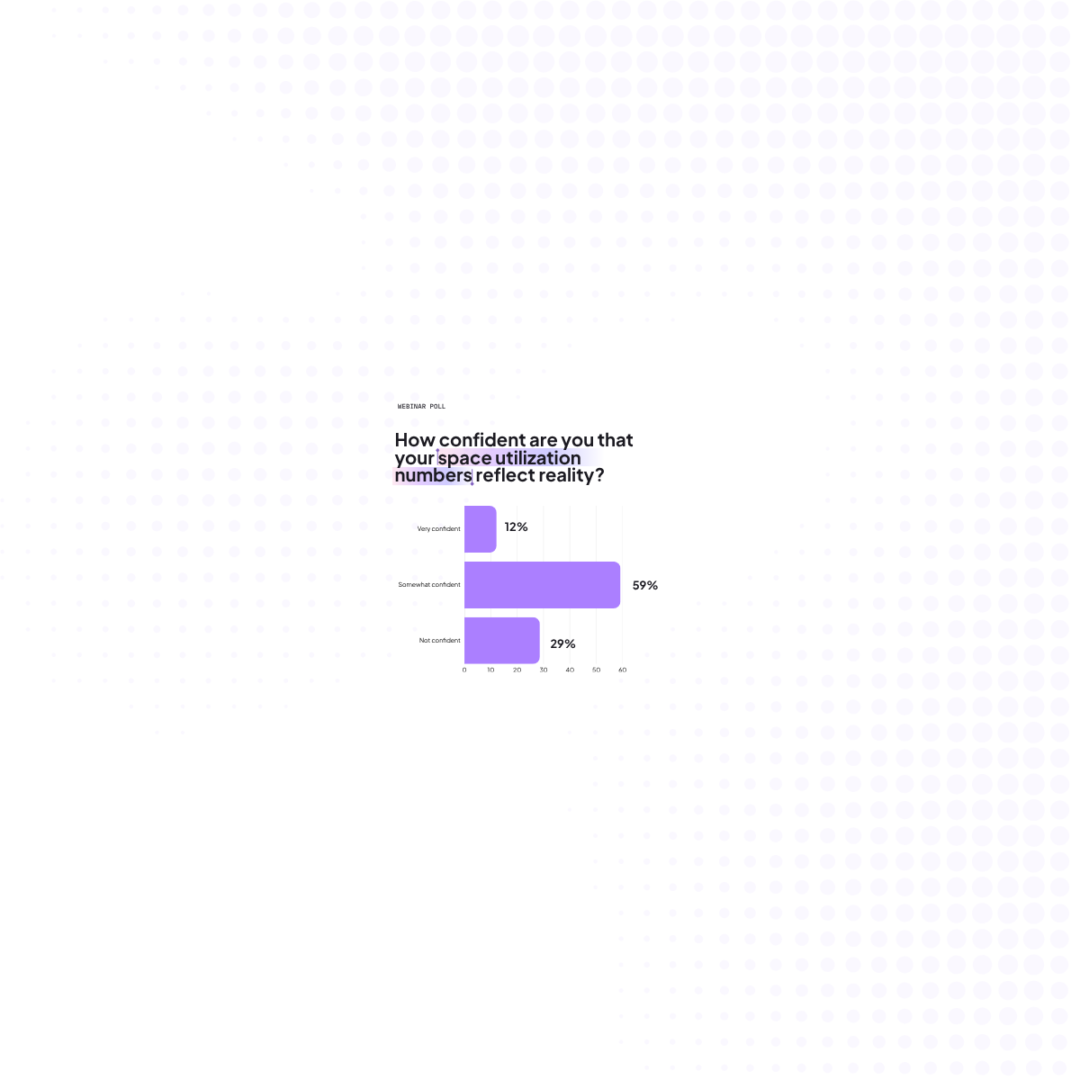
✅How confident are we in the accuracy of our space utilization/occupancy data from 0% to 100%? In a recent poll on a HubStar webinar, only 12% were fully confident in the accuracy of their data:
✅How many separate systems are our space utilization/occupancy, HR and space data currently stored in?
✅How long does it take to access data and pull the reports we need?
✅How many times a year do we currently run a full occupancy planning cycle?
✅If a new hybrid work policy or company reorg landed tomorrow, how long would it take us to create an updated space plan?
✅The last time leadership asked a what if question, how long did it take us to provide an answer?
✅How many different plans do we look into before deciding on one?
✅How much of our current occupancy planning process runs through spreadsheets and floor plan markups?
✅Do our stacking-and-blocking, CAFM and space allocation tools talk to each other, or do we manually bridge them?
Why static occupancy planning tools haven’t kept up
Most tools built for the old planning model share the same five gaps.
1️⃣They can’t run real scenario models, only headcount math.
2️⃣They have no HR data integration, so they can’t connect a person to their actual hybrid pattern.
3️⃣They aren’t end-to-end, which means teams patch them together with custom workarounds and spreadsheets.
4️⃣They don’t help build stakeholder buy-in, because a static report doesn’t hold up well against a direct question in a boardroom.
5️⃣Every policy change or lease renegotiation sends planners back to square one.
What to look for in a Dynamic Occupancy Planning solution
There are a few things separating a dynamic occupancy planning solution from a traditional space planning tool or IWMS:
- One flow from demand to scenario. The ability to quantify demand, optimize allocation, and run scenarios in a single connected process, not three disconnected tools, before a plan ever gets published.
- Automated stacking and blocking, forecasting, scenario planning and floorplan publishing. This frees up planners’ time and mental bandwidth for strategizing and experimenting with what will drive the best workplace experience.
- HR data integration. Integrating with HRIS data (e.g. from Workday) means that employees are matched with the right spaces for their hybrid schedules and business units
- Plans go live immediately across employee-facing apps. Once published, new floor plans and allocation changes should show up immediately in workplace scheduling and employee experience tools, not sit in a document waiting for a separate change-management project to catch up.
- One system for space management, planning and occupancy intelligence in one platform. The ways people use existing space and the ways it’s managed and planned are inextricable, and should always be visualized together.
- Demand-based scenario modeling. The ability to model policy changes, lease timing, and neighborhood allocation together, well beyond simple headcount-growth math. For example, can existing spaces handle it if some teams come in four days instead of three days?
Find out what your team could do with all that time lost in spreadsheet purgatory
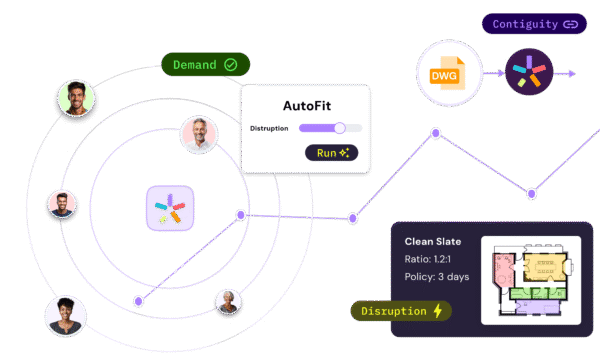
See how Dynamic Planning automates business-unit data collection, stacking passes, and plan publishing, freeing planners for the scenario work and stakeholder conversations that actually need their judgment.
Jackie Towers
Share this post